DON'T FORGET
The reconciliation must be completed and submitted by the 5th of each month.. If this deadline is missed, Mirai will calculate the commission based on the reservation statuses as they appear in the system at that time.
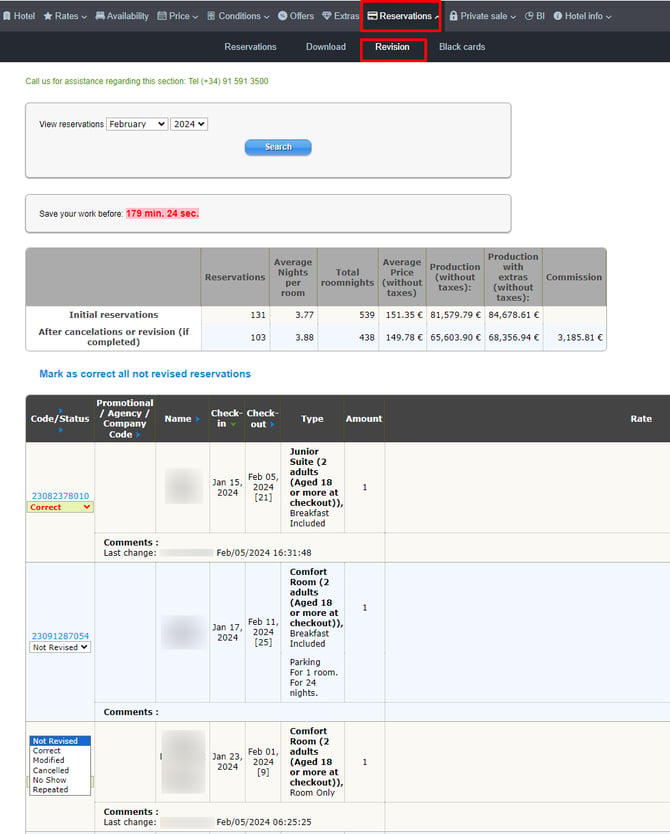
As in the booking section, if you click on the corresponding code in the Code / Status column, the reservation will open in a new window. There you can check all the details and resend notifications to the user or the hotel.
If you click on the corresponding status in the status column, you can directly modify the reservation status.
-
Cancelled from internet It is the user who cancels the reservation. The availability is automatically returned, and the reservation is shown as cancelled here.
-
Not Revised.
-
Correct. After check-out.
-
Modified. You need to enter the new amount of the reservation and the reason for the modification.
-
Cancelled. Mirai's commission amount is updated to zero.
-
No show. Mirai's commission amount is updated to zero.
-
Repeated. Mirai's commission amount is updated to zero.
 Remember to click on the "Save and conclude month" button at the end of the list so that the reservation statuses are modified, and the review is completed.