
You will be able to configure as many tariffs as you want and differentiate them, they will be independent of each other and if you work with a channel manager, they will be the ones you will have to map, allowing you to gain flexibility.
Here are all the details you need to know

In this section, we are going to create the tariff structure, so it is ideal for it to be as flexible as possible, as we will manage the restrictions (minimum stays, advance booking, closures by board type / room / occupancy) in another section.
The prices will also be displayed in another section.
- Public name: This will be the name that will appear on the website, we recommend that it is something attractive to the client, e.g. Best flexible rate. IMPORTANT: translate the name into all the languages of the website.
- Internal name: To help identify the rate internally.
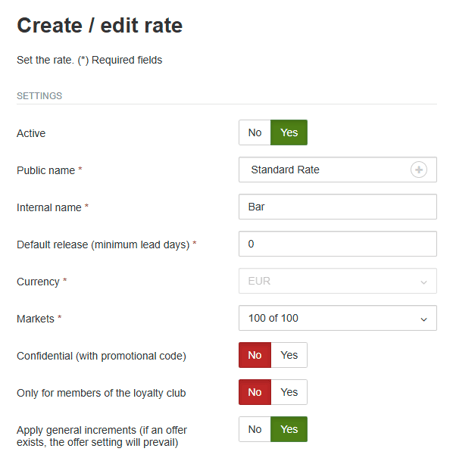
- Default release (minimum lead days): We recommend being flexible, as it can be managed on a daily basis.
- Markets: Here you can configure a rate per market.
- Confidential: Allows you to configure the rate to be made visible with a promotional code.
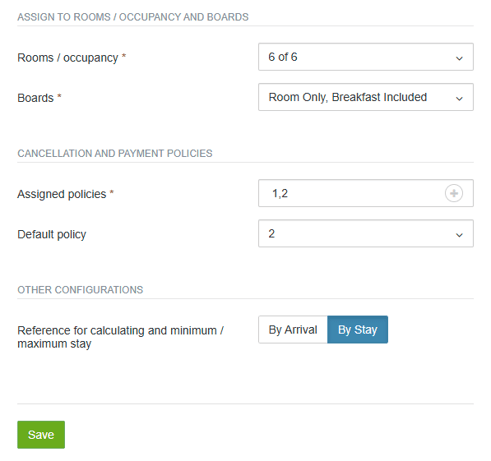
- Rooms / occupancy and meal boards: You can define whether you want the rate to apply to all rooms / occupancies and schemes or not. For example, you can create a special rate for Adult Only rooms or a special rate for the SA independent of the other regimes.
- Cancellation and payment policies: Here you will have to link the cancellation policies to the rate and define which one applies by default. What is the advantage? You can have a default policy of 24 hours and at the same time tell the system to allow you to change it to a more restrictive policy on peak dates.
-
Finally, you can choose whether minimum stays apply on a per-arrival or per-stay basis.
Don't forget to save the changes you've made!
For further information, please contact [email protected].